


How to Send a Broadcast Message Across Channels

Quick Answer
A cross-channel broadcast message sends the same campaign over multiple messaging channels — WhatsApp, Instagram, Facebook Messenger, SMS, email — to the right segment of customers based on their preferred channel and opt-in status. The sequence: segment opted-in contacts, pick a channel-aware template per channel, schedule one campaign across all channels, monitor delivery and reply by channel, then iterate on which channel performs best per segment.
Why Cross-Channel Broadcast Beats Single-Channel
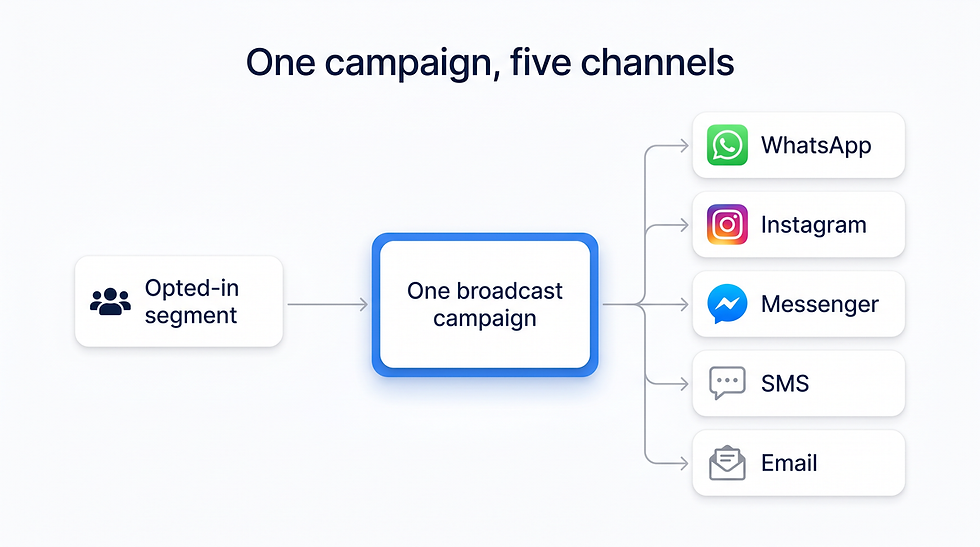
A cross-channel broadcast fans one campaign out to an opted-in segment across WhatsApp, Instagram, Messenger, SMS, and email — reaching each customer on the channel they actually use.
Different customers live on different channels. A 30-year-old shopper opens Instagram DMs faster than email. A 60-year-old loyalty member responds to SMS. A B2B buyer reads email but ignores Instagram. Cross-channel ensures the message reaches each customer where they actually pay attention.
Step 1: Build Channel-Aware Segments
Tag every contact with their preferred channel based on past engagement. If a customer has opened your last 3 Instagram DMs but ignored your emails, send the next campaign on Instagram.
Step 2: Pick or Create Per-Channel Templates
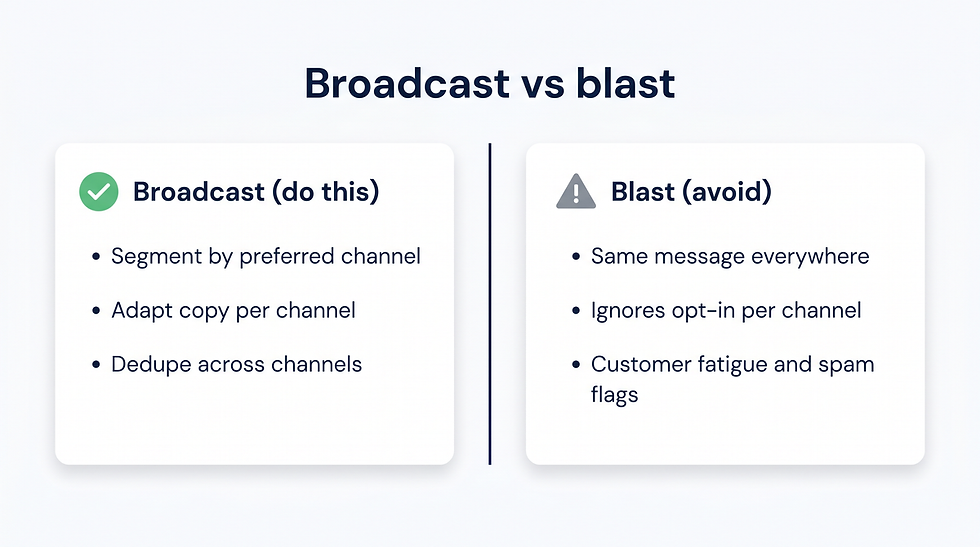
Broadcast versus blast: a true cross-channel broadcast segments by preferred channel, adapts copy per channel, and dedupes — while a blast sends the same message everywhere and ignores per-channel opt-in, inviting fatigue and spam flags.
The same offer needs different framing per channel:
Channel | Template rule |
Meta-approved template, under 200 characters | |
Instagram DM | Short, with one image or product card |
SMS | Under 160 characters, with a short link |
Longer copy, multiple links, full-bleed images |
Step 3: Set Up the Multi-Channel Send
In ChatBooster (or similar), create one campaign with multiple channel branches. Set a per-channel send time. Configure deduplication so a single customer does not receive the same message on three channels.
Step 4: Schedule the Broadcast
Optimize per channel: WhatsApp and Instagram mid-morning and evening; SMS late afternoon; email mid-morning.
Step 5: Monitor by Channel
Track delivery, open, reply, click, and conversion per channel. Drop a channel mid-campaign if it underperforms — for example, if spam complaints start rising.
Step 6: Analyze and Iterate
After 7-30 days, compare ROI per channel per segment. Reallocate next campaign's budget toward the channels that converted.
Compliance Across Channels
Each channel has its own opt-in rules. Honor each: WhatsApp requires explicit opt-in to that channel; SMS requires SMS opt-in; email requires email opt-in. A customer who opted in to email is not automatically opted into WhatsApp.
How ChatBooster Powers Cross-Channel Broadcast
ChatBooster centralizes WhatsApp, Instagram, Facebook Messenger, Threads, TikTok, and live chat. One campaign UI lets you send the same offer per channel with channel-appropriate templates and dedupe across channels.
Frequently Asked Questions
Should I send the same message to all channels at once?
No. Stagger send times by channel and adjust copy per channel.
How do I avoid duplicate sends to the same customer?
Use dedupe rules in your broadcast tool. ChatBooster offers contact-level dedupe across channels.
Which channel converts best for promotions?
It depends on the audience. WhatsApp and SMS typically lead on B2C urgency offers; email leads on long-form B2B.

ChatBooster runs a cross-channel broadcast from one composer: toggle WhatsApp, Instagram, Messenger, SMS, and email, write the offer once, dedupe across channels, and schedule the send to an opted-in segment.
Key Takeaways
Cross-channel broadcast reaches customers on their preferred channel.
Adapt copy per channel — same offer, different framing.
Dedupe to avoid customer fatigue.
ChatBooster handles cross-channel campaigns in one UI.
Run your first cross-channel broadcast free with ChatBooster.


Comments