

Unified Inbox: Why Your Sales and Support Team Needs One in 2026
Updated: Jun 8

A unified inbox is a single workspace that pulls messages from every channel — WhatsApp, Instagram DMs, Facebook Messenger, email, SMS, live chat — into one searchable, assignable thread view. Instead of switching between five apps, the team sees every customer message in one place, replies on the original channel, and shares context across teammates. Teams that move from native apps to a unified inbox typically cut first-reply time from hours to minutes and stop the duplicate-reply problem entirely.
Where Customers Actually Reach Out

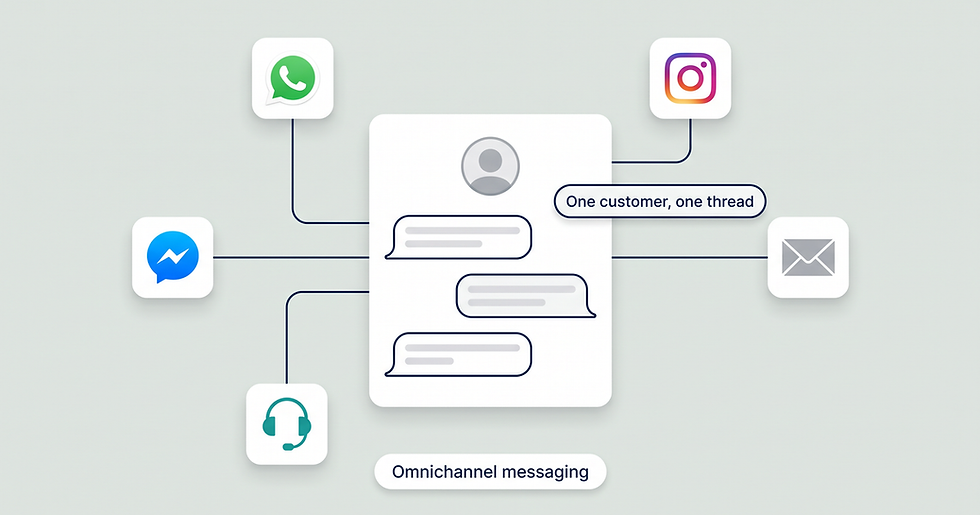
A typical small business fields messages on six channels at once — each with its own purpose, from WhatsApp purchases to SMS delivery updates — which is exactly why they end up scattered across six apps.
A typical small business gets messages on six channels concurrently:
WhatsApp Business — most popular for purchase intent and post-sale support.
Instagram DMs — common from social ad clicks and creator collabs.
Facebook Messenger — older audience, page comments turning into chats.
Live chat on the website — bottom-of-funnel buying questions.
Email — invoices, B2B sales, formal complaints.
SMS — appointment reminders, delivery updates, last-mile.
Each channel has its own native app. Your team logs into six tabs. A new message ping comes from a different sound. Some messages get missed. Some get duplicate-replied. Customer satisfaction drops because consistency disappears.
What a Unified Inbox Actually Does
A unified inbox sits between the channel APIs and your team. Inbound messages from every connected channel land in one queue, get attached to a single customer profile (matched on phone, email, or social handle), and surface as conversation threads. Replies route back out through the original channel — Instagram replies go to Instagram, WhatsApp replies go to WhatsApp — so the customer never notices the platform behind the scenes.
That is the literal definition. The reason it matters operationally is in the next section.
Five Reasons Sales and Support Teams Need a Unified Inbox
1. Reply Time Is a Buying Signal
When a buyer messages you on Instagram and Facebook simultaneously to compare your responsiveness to a competitor, whoever replies first usually wins. Native-app workflows force agents to context-switch between five tabs, which adds minutes per ticket and lets long-tail messages sit overnight. A unified inbox surfaces every channel in one queue, so the slowest channel doesn't become the bottleneck.
2. Multiple Agents, One Customer
Without a shared inbox, two agents can both reply to the same customer with conflicting information. Or worse, both ignore the message thinking the other is on it. A unified inbox shows assignment status, agent presence, and internal notes — so the team behaves like one organism instead of five solo operators.
3. Lost Context Kills Repeat Buyers
A returning customer who has to re-explain their order from last month is a customer leaning toward your competitor. Unified inboxes carry conversation history per customer, regardless of which channel the customer used last time. The agent sees "Sarah ordered the navy hoodie last Tuesday, returned for size, asked about exchange policy on Instagram" before they type the first word.
4. Compliance and Audit Trails
For finance, healthcare, and legal teams, message retention and export are mandatory. Native messenger apps were not built for archival. Unified inboxes handle retention, search, and export by default — and the WhatsApp Business API supports archival through BSP integrations, which is the only Meta-sanctioned route for compliant business messaging on WhatsApp.
US healthcare note: WhatsApp Business API is not HIPAA-covered by Meta out of the box. For PHI-bearing messages, work with a BSP that signs a BAA, or limit WhatsApp traffic to non-PHI logistics (appointment time, location, reminder) and route clinical detail through a HIPAA-compliant channel.
5. Manager Visibility
Sales and support managers need a single dashboard for SLA tracking, agent productivity, queue depth, and customer satisfaction. Native apps don't surface any of this. A unified inbox gives managers daily/weekly/monthly reporting across every channel and agent — letting them coach, hire, and budget on real numbers.
How a Unified Inbox Works (Architecture)

How a unified inbox works: every channel feeds a central message store that matches identity on phone, email, or social handle; conversations surface in one inbox UI; and replies route back out on the original channel.
The platform connects to each channel via official APIs:
WhatsApp Business API via Meta Cloud API (direct or through a BSP like ChatBooster). Cloud API has been Meta's standard since 2025; On-Premises API is sunset.
Instagram Messaging API
Meta Messenger Platform
SMS gateway (Twilio, Bird, etc.)
Email (IMAP/SMTP or Gmail/Microsoft Graph)
Embedded live chat widget (provided by the platform)
Incoming messages flow into a central message database, get attached to a customer profile (matched on phone, email, or social ID), and surface in the inbox UI as conversation threads. Outgoing replies route back through the original channel — so a reply to an Instagram DM goes back to Instagram, not over email.
Bonus: most modern unified inboxes include an automation layer (no-code flow builders, AI auto-replies, tag-based routing) so high-volume teams can offload routine inquiries. See our omnichannel messaging guide for how a unified inbox fits into a wider cross-channel strategy.
Separate Apps vs Unified Inbox: Day-in-the-Life Comparison
Activity | Separate apps | Unified inbox |
Check overnight messages | Open 5 apps | Open 1 inbox |
Spot duplicate-reply risk | Manual coordination | Auto-flagged |
Hand off ticket to teammate | Send screenshot via Slack | Assign in app |
Find a customer's order history | Search 5 places | One profile view |
Pull weekly reply-time report | Not possible per-channel | One dashboard |
Send promotional broadcast | Per-channel manually | Coordinated cross-channel send (WhatsApp templates still require Meta approval per language) |
Reply on the move | App-switch hell | Single mobile app |
How ChatBooster's Unified Inbox Works

ChatBooster's unified inbox brings WhatsApp, Instagram, Messenger, and live chat into one workspace with assignment, notes, and full customer history — mirrored in a mobile app for replies on the go.
ChatBooster's inbox integration unifies WhatsApp Business API, Instagram, Facebook Messenger, and website live chat into one workspace. Threads is supported via Meta's partner messaging access where available, and TikTok DM coverage is scoped to TikTok Shop's messaging API for merchant accounts — confirm channel scope with the ChatBooster team for your region before committing. Each customer's full cross-channel history surfaces alongside their tags, contact details, and recent purchase or interaction events. Teams can assign, mention, drop internal notes, and route by tag or workflow stage — all without leaving the inbox. A mobile app mirrors the desktop experience for replies on the go.
See the ChatBooster inbox demo → (no credit card, WhatsApp connected in under 15 minutes)
When You Should Move to a Unified Inbox
You probably need one when any of the following is true:
You have 2+ team members responding to customer messages.
Customers regularly reach you on 3+ channels.
You miss a message at least once per week.
A customer has had to re-explain their problem because the agent who picked up didn't see prior history.
You are running marketing campaigns and need to track replies/conversions across channels.
You probably don't need one yet when:
One person handles every message and your volume is under ~20 inbound conversations/day.
You only operate on a single channel.
All your conversations are read-once with no follow-up needed.
Frequently Asked Questions
What is a unified inbox in business messaging?
A unified inbox is software that aggregates customer messages from multiple channels (WhatsApp, Instagram, Facebook Messenger, email, SMS, live chat) into a single workspace. The team can read, reply, assign, and report from one place instead of switching between five apps.
What is the difference between a unified inbox and an omnichannel messaging platform?
A unified inbox is one feature — the message-aggregation interface. A unified inbox platform includes a unified inbox plus shared customer profiles, cross-channel routing, segmentation, broadcast tools, and customer-level reporting. Most modern unified inbox tools are also omnichannel platforms. See our omnichannel messaging guide for the distinction in detail.
How is a unified inbox different from a shared mailbox in Gmail or Outlook?
A shared mailbox handles only email. A unified inbox handles email and live chat and social messaging and SMS — and binds them to one customer profile. If your business runs primarily on email, a shared mailbox may be enough.
Can a unified inbox include WhatsApp Business?
Yes, but only via the WhatsApp Business API. The consumer WhatsApp app and the WhatsApp Business app (the free SMB app on Google Play / App Store) cannot connect to a unified inbox — only the WhatsApp Business API can. Migrating an existing Business-app number to the API is a one-time process managed by a BSP (like ChatBooster, Wati, or Twilio) and preserves your phone number.
How much does a unified inbox cost?
Entry-level unified inboxes start in the low double-digits USD per agent per month. Plans with WhatsApp Business API, automation, and unlimited contacts typically run in the low to mid hundreds per month for the platform fee. On top of that, Meta charges messaging fees — utility templates are billed per message in many markets (rollout started July 2025), while marketing, authentication, and service conversations remain per-conversation under Meta's current pricing model. Rates vary by country and template category; check Meta's WhatsApp Business pricing page for current numbers.
Does a unified inbox work on mobile?
Modern unified inboxes have native iOS and Android apps that mirror desktop conversations. Push notifications, voice notes, and image replies all work on mobile. ChatBooster's mobile app, for example, supports the full conversation, tagging, and assignment workflow.
Key Takeaways
A unified inbox aggregates every customer-facing channel into one workspace so teams stop switching between apps.
Five business benefits: faster reply time, no duplicate replies, full customer history, audit-ready compliance, manager visibility.
It connects to channels via official APIs (WhatsApp Business API via Meta Cloud API, Instagram/Messenger APIs, SMS gateways, email IMAP/SMTP).
Move to a unified inbox when you have 2+ agents, 3+ channels, or any history of missing messages.
Rule of thumb: under ~20 inbound conversations/day handled by one person → still fine on native apps; above that, or with multiple agents → unified inbox.
ChatBooster's unified inbox supports WhatsApp Business API, Instagram, Facebook Messenger, and website live chat — with Threads and TikTok Shop coverage where available — and ships with tagging, assignments, and a mobile companion app.
Try ChatBooster free — connect WhatsApp and reply from one inbox in under 15 minutes. No credit card.


Comments