

Omnichannel Inbox vs Shared Inbox: Real Differences in 2026 (And Which One You Need)
Updated: Jun 8

A shared inbox is a team workspace for one channel — usually email (Help Scout, Front, Gmail shared mailbox) or one WhatsApp number. Multiple agents see and reply from the same address, but the inbox only knows about that channel. An omnichannel inbox is a single workspace that pulls every customer channel (WhatsApp, Instagram, Messenger, live chat, email, SMS) into one queue and binds them to one customer profile. Pick a shared inbox when your customers reach you on only one channel and the team just needs assignment and audit. Pick an omnichannel inbox the moment the same customer can contact you on two or more channels — because the cost of stitching identities by hand grows faster than the platform fee.
Definitions, Side by Side

The real difference is the primary record: a shared inbox keys everything to the channel; an omnichannel inbox keys everything to the customer — identity matching, routing, and reporting all follow from that choice.
These two terms get used interchangeably in marketing copy, but they describe different products with different scopes.
Shared inbox (single-channel). A multi-agent UI on top of one channel. The canonical example is a shared email mailbox like support@yourcompany.com accessed in Help Scout, Front, Gorgias, or Gmail collaborative inbox. Some "shared inbox" products are WhatsApp-only — they connect one WhatsApp Business number, let several agents reply, and stop there. Everything in the workspace is scoped to that one channel: assignment, tags, reporting, customer profile.
Omnichannel inbox (multi-channel). A workspace that ingests messages from every channel a customer might use — WhatsApp Business API, Instagram DM, Facebook Messenger, live web chat, email, SMS, Threads — and routes them into one queue. The customer profile is shared across channels: a customer who messages on Instagram one week and WhatsApp the next surfaces as one person, not two. Reporting, routing rules, and SLA timers all operate at the customer level, not the channel level.
The difference is not "more channels." A shared inbox can grow to handle two or three channels by bolting on connectors. The difference is identity unification: an omnichannel inbox treats the customer as the primary record; a shared inbox treats the channel as the primary record.
Side-by-Side Comparison
Dimension | Shared Inbox | Omnichannel Inbox |
|---|---|---|
Channel scope | One channel (typically email or one WhatsApp number) | All channels — WhatsApp API, Instagram, Messenger, live chat, email, SMS, sometimes Threads / TikTok |
Primary record | The channel (mailbox / number) | The customer (one profile per person) |
Conversation history | Within one channel only | Across all connected channels |
Identity matching | Manual or none | Automatic on phone, email, social handle |
Assignment & internal notes | Yes, scoped to one channel | Yes, scoped to the customer across channels |
Cross-channel routing | N/A | Tag-based, lifecycle-stage, customer-aware |
WhatsApp 24-hour window awareness | Sometimes (WhatsApp-only shared inboxes) | Yes, with auto-switch to Meta-approved utility templates |
Reporting unit | Per-channel KPIs | Customer-level KPIs |
Customer feels like | Talking to a channel team | Talking to one company |
Typical price band | Lower per-seat | Higher per-seat (platform tier + identity layer) |
Best fit | Single-channel SMB, email-first support | Multi-channel SMB upward, retention-focused brands |
The pricing line is genuinely real, not just sales positioning. Vendors charge more for the identity layer, cross-channel routing, and customer-level reporting that omnichannel platforms ship by default. Price a like-for-like quote before deciding — list of channels needed, seat count, expected monthly conversations.
When a Shared Inbox Is Enough
A shared inbox is the right call (and a smaller bill) in these cases.
You operate on one channel only. If 95% of your customer messages arrive on email and the rest you can ignore, a shared email inbox (Help Scout, Front, Gmail collaborative inbox) covers the workflow with less configuration than an omnichannel platform. The same applies if your business runs entirely on WhatsApp and you have no plans to add Instagram or Messenger.
Channel switching is rare among your customers. Some audiences stick to one channel. Older B2B buyers tend to email. Some Southeast Asian SMB audiences live entirely on WhatsApp. If you can show from your last 12 months of tickets that the same customer almost never crosses channels, the omnichannel premium is paying for capacity you don't use.
Compliance is the main driver. If you mostly need an audit trail, assignment, and SLA tracking on a single channel — and you don't care about customer-level reporting — a shared inbox covers it. Most shared-inbox tools ship export, retention, and search by default.
You are still validating the channel mix. Brands in their first year of operation often don't yet know which channels their customers prefer. A single shared inbox per channel (one for email, separate one for WhatsApp) is a low-commitment way to learn before committing to a multi-channel platform.
When You Need an Omnichannel Inbox
The omnichannel premium starts paying off when any of the following is true.
Same customer, multiple channels
The clearest signal is a customer who DMs you on Instagram, then 24 hours later messages your WhatsApp Business number to follow up on the same order. In a shared-inbox-per-channel setup, the WhatsApp agent has no idea about the Instagram thread, and you either ask the customer to repeat themselves (slow) or stitch the threads manually (error-prone). An omnichannel inbox surfaces the full cross-channel history before the agent types a word.
Customer profile unification matters
If your team uses customer history to upsell, segment, or personalise replies — recent orders, lifecycle stage, support history, abandoned-cart events — that history needs to live in one record, not five per-channel records. Omnichannel inboxes match on phone, email, and social handle to merge identities. Shared inboxes don't.
Multiple agents, multiple channels
The moment you have two or more agents covering two or more channels, the assignment math gets ugly without a unified queue. Agent A is heads-down on WhatsApp; agent B watches Instagram; an urgent message lands on Messenger and nobody sees it for hours. An omnichannel inbox surfaces the slowest queue automatically and routes by load and skill, not by which app the agent happened to have open.
Cross-channel marketing campaigns
If you are running ads that drive replies into WhatsApp and Instagram simultaneously, you need attribution and reply routing that knows which campaign drove the message. That's a customer-level reporting problem — a shared inbox can't do it. See our omnichannel messaging overview for how routing fits with marketing flows.
Migration Considerations
Moving from a stack of shared inboxes to an omnichannel inbox is not a swap-out; it's a small project. Budget for the following.
Data continuity. Most omnichannel platforms can import existing conversation history via CSV or per-channel migration tools. But mappings are imperfect — internal notes, custom tags, and assignment history often don't round-trip cleanly. Decide upfront whether you need a full historical migration or just a clean start with a 30-day overlap.
Customer identity reconciliation. The biggest one-time win of moving to an omnichannel inbox is identity merging — but it requires clean source data. If your email shared inbox has john@acme.com and your WhatsApp shared inbox has +1-555-0102 and nobody linked them before, the omnichannel platform can only merge them when both keys appear on the same conversation. Plan a tagging or audit pass during migration to seed identity matches.
Agent retraining. Agents who lived in Help Scout for two years will not naturally switch to a cross-channel inbox. Workflows change: replies are channel-aware (a reply to an Instagram message returns to Instagram, not over email), assignment rules now span channels, and SLA timers may anchor on WhatsApp's 24-hour customer-service window for some conversations. Budget a week of pair-handling per agent.
Total cost. Omnichannel platforms run higher per-seat. On top of the platform fee, the WhatsApp Business API charges per conversation or per message (depending on category and country, with Meta migrating utility templates to per-message billing in many markets since July 2025). For an apples-to-apples cost comparison, add: current shared-inbox tools combined + the per-conversation Meta cost you'd pay either way. Many shops find the line-item omnichannel premium is mostly a wash once they remove three single-channel tools.
Architecture Differences
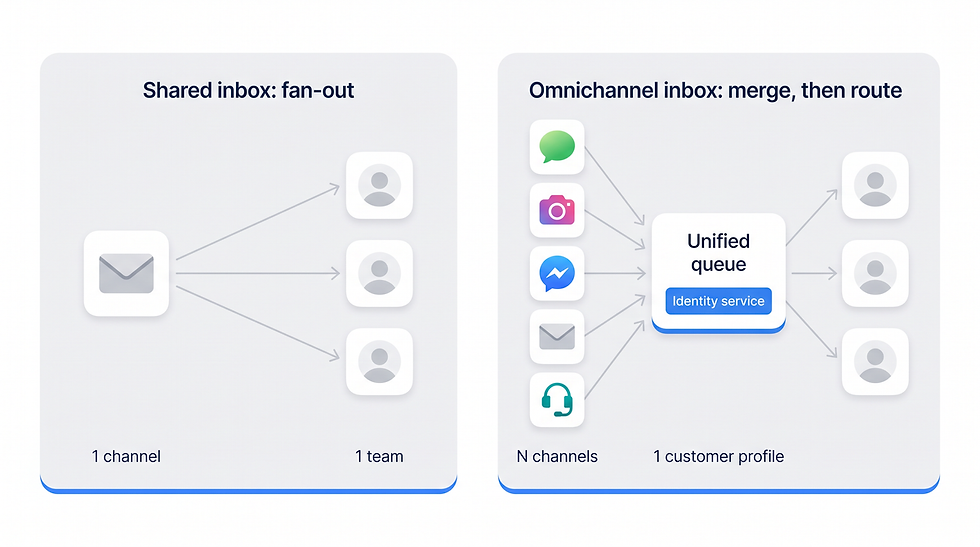
Two architectures: a shared inbox fans one channel out to a team; an omnichannel inbox merges every channel into one customer-keyed queue — with an identity service — before routing to agents.
The two architectures look different from the start. A shared inbox is a one-to-many fan-out from a single channel to a team. An omnichannel inbox is a many-to-one merge: all channels feed into one customer-keyed queue, which then fans out to agents.
The implementation difference centres on three things the omnichannel side handles that the shared side doesn't:
Identity service. Phone, email, and social handle are merged into a single customer record. Without this, "cross-channel context" is a marketing claim, not a real feature.
Channel-aware reply routing. A reply to an Instagram DM goes back through the Instagram Messaging API. A reply inside the WhatsApp 24-hour customer-service window goes free-form; outside the window it auto-switches to a Meta-approved utility template. A shared inbox doesn't need this logic because it only speaks one protocol.
Customer-level reporting. First-reply time per customer, resolution time per customer, conversations-per-customer trend. Per-channel reports are still available, but the unit of analysis is the person, not the inbox.
How ChatBooster's Omnichannel Inbox Works

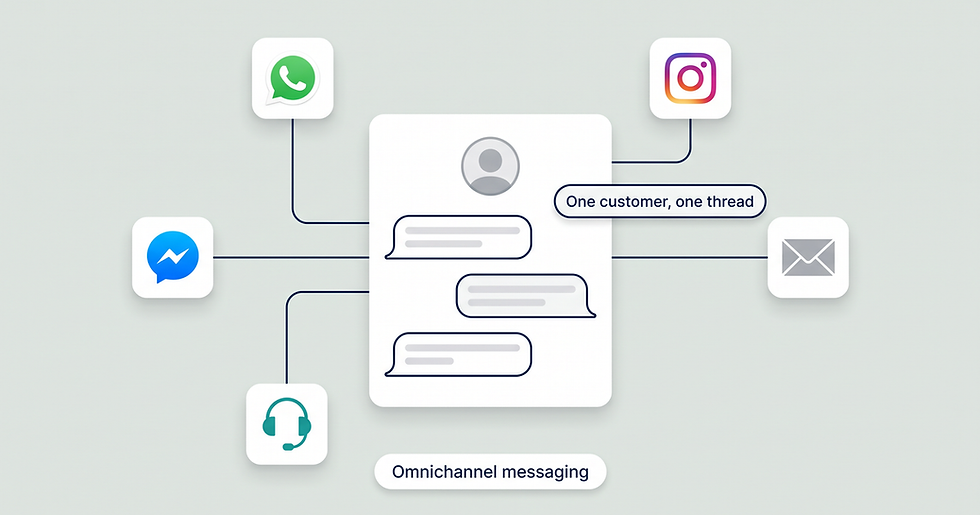
ChatBooster's omnichannel inbox: every channel in one queue, the conversation continues across channels, and the customer profile shows merged identities — phone, email, and social handle.
ChatBooster's omnichannel inbox unifies WhatsApp Business API (Meta Cloud API), Instagram, Facebook Messenger, and live web chat into one workspace, with Threads supported via Meta's partner messaging access where available. Customer profiles unify automatically when phone, email, or social handle match — so a customer who first messaged on Instagram and later moved to WhatsApp surfaces as one person with one history. The unified inbox view lets agents reply on the original channel without app-switching, and the automation flow builder handles cross-channel routing — for example, auto-firing a Meta-approved utility template when an Instagram-originated conversation has gone idle past the WhatsApp 24-hour service window.
For teams migrating from a stack of shared inboxes, the contacts management layer surfaces identity merges so the team can audit which customer records are being unified during the first week.
See the ChatBooster omnichannel inbox → (no credit card; WhatsApp connected in under 15 minutes; Meta display-name approval may take additional business days)
Decision Tree: Which One Do You Need

Which inbox you need comes down to channels and identity: one channel, a shared inbox is enough; many channels with separate customers, per-channel shared inboxes; many channels with the same customer across them, an omnichannel inbox.
The fastest way to decide is to walk through two questions: do you actually operate on more than one channel, and do you need a single customer profile across them.
Most teams who walk this tree honestly end up on the omnichannel side once they hit 2+ channels with any meaningful customer overlap. The exception is genuinely single-channel businesses — and those are rarer than they appear, because most brands underestimate how often their existing customers cross channels.
Frequently Asked Questions
What is an omnichannel inbox?
An omnichannel inbox is a single workspace that pulls customer messages from all your channels (WhatsApp, Instagram, Facebook Messenger, live chat, email, SMS, sometimes Threads) into one queue, with each message attached to a unified customer profile. Agents reply on the original channel without app-switching, and conversation history follows the customer across channels.
How is an omnichannel inbox different from a shared inbox?
A shared inbox is a multi-agent UI for one channel — typically email or one WhatsApp number. An omnichannel inbox is a multi-agent UI for every channel with a unified customer profile that links identities across them. The shared inbox treats the channel as the primary record; the omnichannel inbox treats the customer as the primary record.
Is a unified inbox the same as an omnichannel inbox?
In most product copy, yes — the terms are used interchangeably. Strictly, "unified inbox" describes the UI feature (one queue, many channels) and "omnichannel inbox" describes the broader concept (unified inbox + shared customer profile + cross-channel routing + customer-level reporting). Most modern unified inbox products ship the full omnichannel stack under the same SKU.
Can a shared inbox handle WhatsApp?
Yes — but only via the WhatsApp Business API, and only as a single-channel setup. The free WhatsApp Business app is single-operator and cannot be a shared inbox. WhatsApp-only shared inboxes exist (older 360dialog setups, simpler Wati plans) and are valid if you operate on WhatsApp alone. The moment you add Instagram or Messenger, you've left shared-inbox territory.
Will I lose conversation history if I migrate from a shared inbox to an omnichannel inbox?
Not necessarily, but plan for it. Most omnichannel platforms support per-channel imports via CSV or migration tooling. Internal notes, custom tags, and assignment history often don't round-trip cleanly, so decide upfront whether you need a full historical migration or a 30-day overlap with a clean start.
How much does an omnichannel inbox cost compared to a shared inbox?
Omnichannel platforms charge a higher per-seat platform fee than single-channel shared inboxes, reflecting the identity layer and cross-channel routing. But total cost is often comparable once you remove the multiple shared-inbox tools you'd otherwise run side by side. On top of the platform fee, WhatsApp Business API charges per conversation or per message (depending on category and country) — those fees apply either way. See Meta's WhatsApp Business pricing page for current rates.
Do I still need a CRM if I have an omnichannel inbox?
Probably yes, but for different reasons. An omnichannel inbox handles real-time conversations and the customer profile inside the conversation context. A CRM stores deeper customer data (deals, accounts, lifecycle history, marketing automation). Most omnichannel inboxes push events to Salesforce, HubSpot, or Zoho via native connectors or webhook.
Key Takeaways
A shared inbox is a team workspace for one channel (usually email or one WhatsApp number). An omnichannel inbox is a team workspace for all channels with a unified customer profile.
The real difference is the primary record: channel-keyed (shared) vs customer-keyed (omnichannel). Identity matching, cross-channel routing, and customer-level reporting follow from that choice.
Stay on a shared inbox if you operate on one channel only, channel switching is rare among your customers, or you are still validating channel mix.
Move to an omnichannel inbox the moment the same customer can reach you on two or more channels, profile unification matters, or you run cross-channel marketing campaigns.
Migration cost = data continuity + identity reconciliation + agent retraining + the per-seat platform premium. Often a wash once you remove the multiple single-channel tools the omnichannel inbox replaces.
Try ChatBooster free to unify WhatsApp, Instagram, Facebook Messenger, and live web chat in one omnichannel inbox. No credit card. WhatsApp connected in under 15 minutes.


Comments